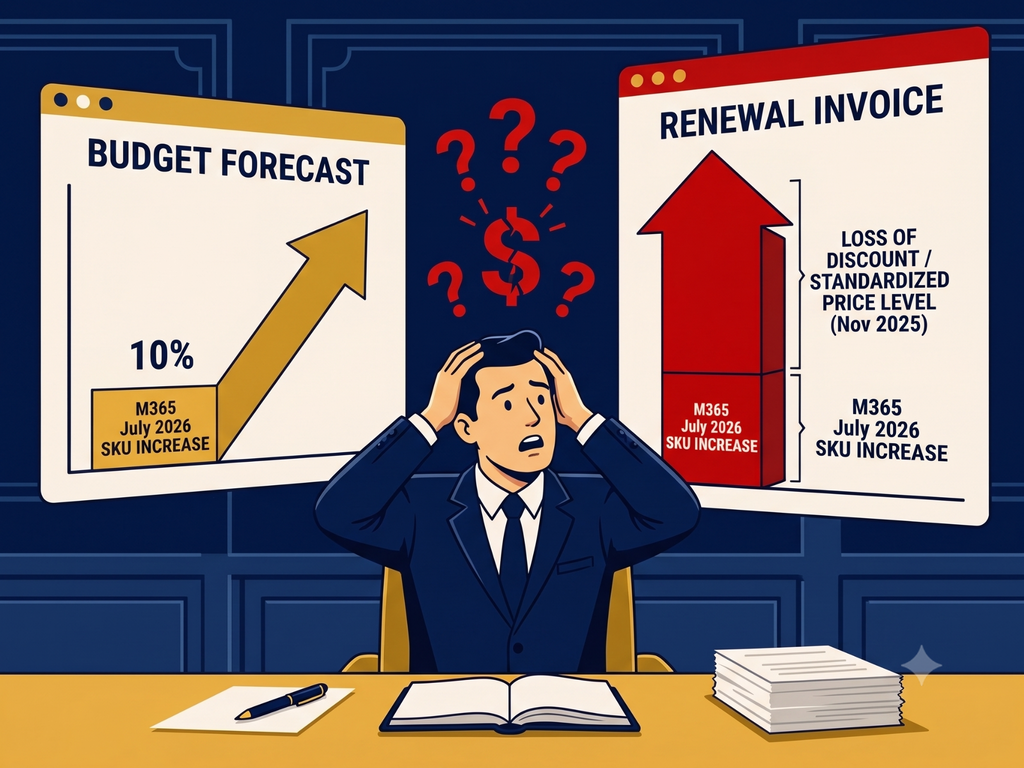
The Microsoft price increase you budgeted for is not the number that will show up on your renewal invoice.
Why is my Microsoft 365 renewal costing more than the price increase
The published July 2026 increase, somewhere between 5 and 33 percent depending on your suite, is one of two changes affecting your renewal. Most finance teams only account for one. Beginning November 1, 2025, Microsoft standardized Online Services pricing across Enterprise Agreement Price Levels A through D. If your current agreement was priced at one of the deeper levels, that advantage may not carry into your next renewal. The two changes were announced eight months apart, and they tend to land on different desks. Finance builds the renewal forecast off the published SKU increase because that number is public and easy to model. Procurement or IT usually holds the actual Price Level history, and rarely gets asked for it until the invoice already looks wrong. By the time anyone connects the two, the number presented to the CFO is already the wrong one, and it is rarely off by a rounding error. It is usually off by the full weight of the discount tier nobody rechecked.
What the two changes actually do to your number
Take a Microsoft 365 E5 customer as an example. The published suite price moved from 57 dollars to 60 dollars per user per month, a 5 percent increase. That is the number in the announcement. If that same customer also loses a deeper Price Level discount at renewal, the effective increase moves well past 5 percent. Analysts modeling large enterprises coming off top tier discounts have put the combined effect in the range of 15 to 23 percent. The exact result depends on your prior price level, seat count, suite mix, and renewal date, but the pattern holds broadly. The published percentage tells you what changed on the price list. It does not tell you what changed on your invoice.
Why this keeps getting missed
The published number is easy to find and easy to cite, which is exactly why it becomes the anchor for the whole budget conversation. Your own price level history sits in a different system, tracked by a different team, and nobody owns the job of checking it before the renewal forecast goes out. That gap between who has the SKU number and who has the discount number is where the wrong figure gets approved.
What to check before you take a number to your CFO
Pull your actual effective cost per user today, not the number on the original agreement. Ask whoever manages the Microsoft relationship, procurement, IT, or your reseller, which Price Level your current pricing depends on, and confirm directly whether that level survives renewal or resets. Then apply the July 2026 SKU change against the corrected level, not against your old effective rate. If nobody in the renewal conversation can answer the Price Level question without checking, that is the exact gap this piece is describing, and it is worth closing before the number goes to your CFO instead of after.
The number that matters
The published Microsoft increase is a market announcement. Your renewal is a commercial calculation you still have to run yourself. If your Microsoft agreement renews anytime in the next twelve months, build your forecast from your current effective price, not the announced list price increase. That is the number your CFO will approve, and the one you will have to defend later if it is wrong.
If a renewal is what is in front of you right now, this is where to start. It covers what is actually at stake in a technology renewal and the questions worth answering before you sign.